
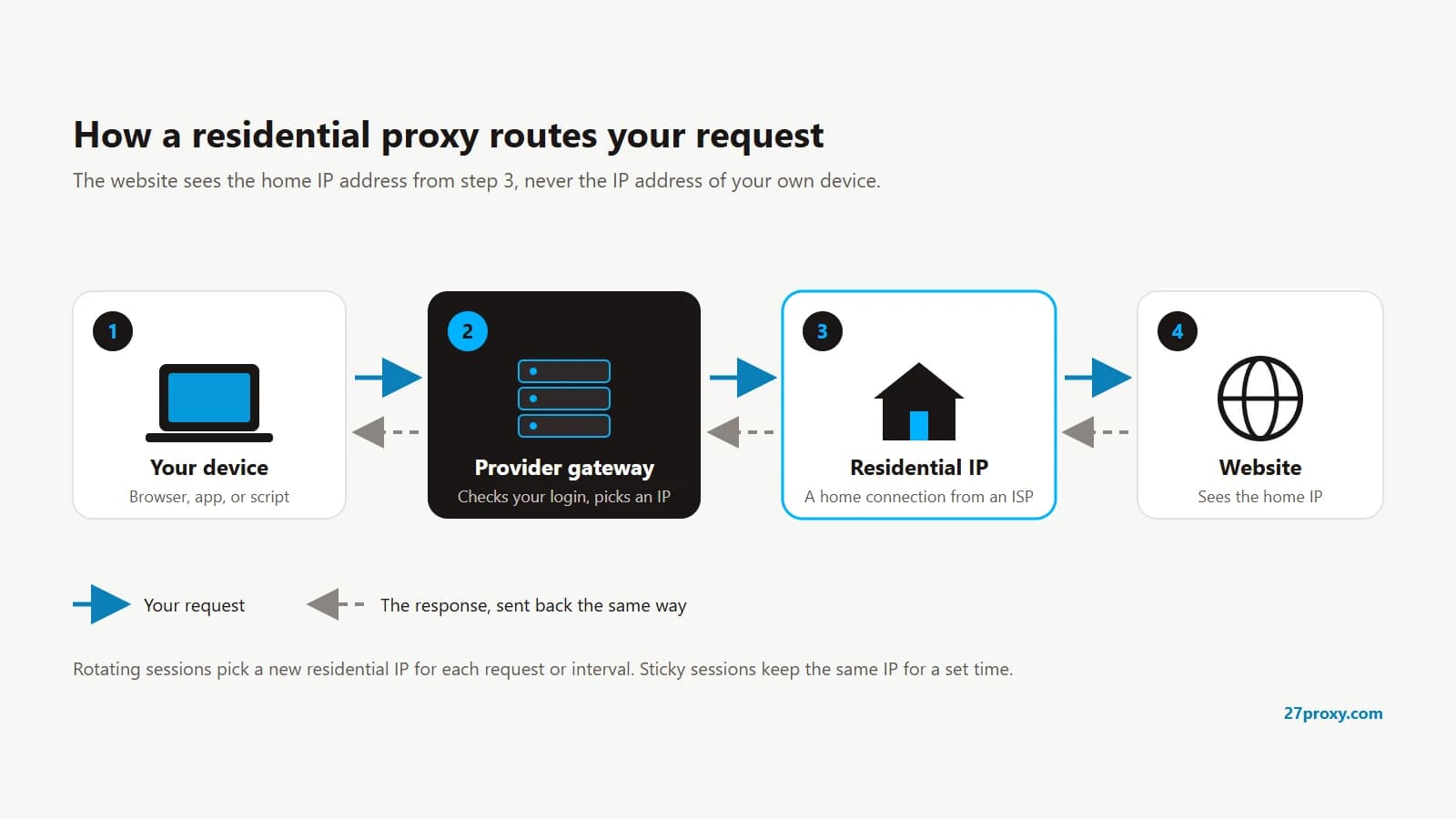
A residential proxy is a proxy server that sends your internet traffic through an IP address an internet service provider (ISP) assigned to a real home connection. Websites see that household IP instead of yours, so your requests look like ordinary home visitors from the country, city or ISP you choose.
How does a residential proxy work?
- Your browser or tool sends a request to the proxy provider's gateway, using the hostname, port, username and password from your plan.
- The gateway picks a residential IP that matches your settings, such as country, city or session type.
- The request leaves from that residential IP and reaches the website.
- The website replies to the residential IP, and the response travels back through the gateway to you.
Your own IP is never sent to the website; your device only connects to the provider's gateway.
Where do residential IPs come from?
Providers build residential pools from home devices that share their connection. Common sources include:
- Apps and browser extensions that include a provider's SDK and ask users to share idle bandwidth, often in exchange for a free app or a payment
- Peer-to-peer networks whose members opt in to route traffic
- Internet providers that lease IP ranges to proxy companies, usually sold as ISP or static residential proxies
Consent matters. Some networks have been built from devices infected with malware, without the owners knowing; the 911 S5 botnet dismantled in 2024 sold residential proxy access from such devices. Choose providers that state how they source their IPs and how device owners agree to take part.
Residential vs datacenter, ISP and mobile proxies
| Type | Where the IP comes from | Typical trait |
|---|---|---|
| Residential | Home connections from ISPs | Looks like a normal home user; billed by GB or by IP |
| Datacenter | Cloud and hosting providers | Fast and cheap, but easy for websites to recognise |
| ISP (static residential) | ISP-registered IPs hosted in data centres | Residential-looking IP that stays the same |
| Mobile | Mobile carrier networks (4G/5G) | Many users share each IP, so sites are cautious about blocking it |
Residential proxy vs VPN
A VPN encrypts all traffic from your device and sends it through one server you pick, mainly for privacy. A residential proxy works per app or per request and gives you a choice of many home IPs and locations. Most proxy connections are not encrypted end to end by the proxy itself. HTTPS websites still encrypt the page content.
Rotating vs sticky sessions
- Rotating: each request, or each new connection, uses a different IP from the pool. This suits large numbers of independent page loads.
- Sticky: you keep the same IP for a set time, often 1 to 30 minutes or longer, depending on the provider. This suits sign-ins, carts and multi-step forms that expect one visitor.
Per-GB vs per-IP residential plans
Residential plans are billed in one of two ways, and the right one depends on how you use the proxy.
| Detail | Per-GB plan | Per-IP plan |
|---|---|---|
| You pay for | Traffic sent and received | Each IP you take from the pool |
| Best for | Many IPs and rotating sessions | Long sessions on a few chosen IPs |
| Cost grows with | Page size and request count | Number of IPs used |
| On 27Proxy | Residential GB | Regular IPs |
On 27Proxy, both are sold as activation codes (CDKs). After payment is confirmed, the code appears on your Orders page, and you redeem it with the proxy provider.
How to use a residential proxy
Step 1
Get your proxy details
Your provider gives you a hostname, port, username and password, or lets you whitelist your own IP instead.
Step 2
Choose a location and session
Pick the country, and rotating or sticky sessions, in the provider's dashboard or in the username options.
Step 3
Enter the proxy in your app
Add the details to your browser's proxy settings, a proxy extension, or your tool's proxy field.
Step 4
Check your IP
Visit an IP lookup site and confirm it shows the proxy's IP and location, not your own.
For a full walkthrough with one provider, see How to download and use 9Proxy on PC, Android and iPhone.
What are residential proxies used for?
- Checking ads, prices and search results as they appear in other countries or cities
- Testing websites and apps that show different content by location
- Collecting public web data at a scale one IP cannot handle
- Managing several accounts on platforms that allow it, each from its own IP
Are residential proxies legal?
A residential proxy is a networking tool; what decides whether your use is allowed is the law that applies to you and the terms of the websites you visit, so check both for your own case. Ethical sourcing also matters: a proxy pool built from devices without their owners' consent is a problem even if your own use is legitimate.
Browse residential proxy CDKs on 27Proxy, or compare per-GB and per-IP plans. Already using 9Proxy? See 9Proxy alternatives.
Common questions
Is a residential proxy faster than a datacenter proxy?
Usually not. Traffic passes through a home connection, which adds distance and depends on that household's speed. Residential proxies are chosen because websites accept their IPs, not for speed.
Can websites detect residential proxies?
They are harder to detect than datacenter IPs, because the IP belongs to a home ISP. Websites can still notice unusual behaviour, such as very fast requests or a mismatch between the IP's location and the browser's time zone and language.
Do I need software to use a residential proxy?
Not for most per-GB plans, which work as a standard hostname, port, username and password. Some per-IP plans, such as 9Proxy IP, use the provider's desktop app to forward each IP to a local port.
What is a static residential proxy?
A static residential proxy, also sold as an ISP proxy, is one address from an ISP's residential range that stays the same for as long as your plan runs instead of rotating from a pool. It suits logged-in sessions that must keep one IP; see the ISP row in the comparison table above.